Choosing the best Retro Phone Handset is not only about nostalgic appearance. It involves sound quality, material durability, comfort, and compatibility with modern telephone systems. A handset may look perfect in a product photograph, yet feel heavy and awkward after several minutes. Small details matter, including the receiver’s balance, cable flexibility, earpiece shape, and button response.
Dieter Rams, a leading industrial design authority, once said, “Good design is as little design as possible.” This idea suits the Retro Phone Handset market. A well-designed model should display character without sacrificing practical performance. Look for a solid receiver that rests naturally between your shoulder and ear. Check whether the cord resists tangling. Listen for clear voices, without constant buzzing or sharp volume changes. These details reveal more than decorative brass accents.
Some choices remain personal. Very true.
A heavy handset can suggest quality, but it may become tiring during long conversations. A glossy finish can look dramatic, although fingerprints quickly weaken its appeal. Buyers should also confirm connection requirements, especially when using adapters or digital telephone services. Product testing, warranty information, and transparent specifications provide stronger evidence than vintage styling alone.
This guide will compare the main handset materials, connection types, audio features, ergonomic designs, and maintenance needs. It will also question a common assumption: older-looking does not always mean better made. The right Retro Phone Handset should feel authentic, operate reliably, and remain comfortable in everyday use. Nostalgia starts the decision. Practical experience should finish it.
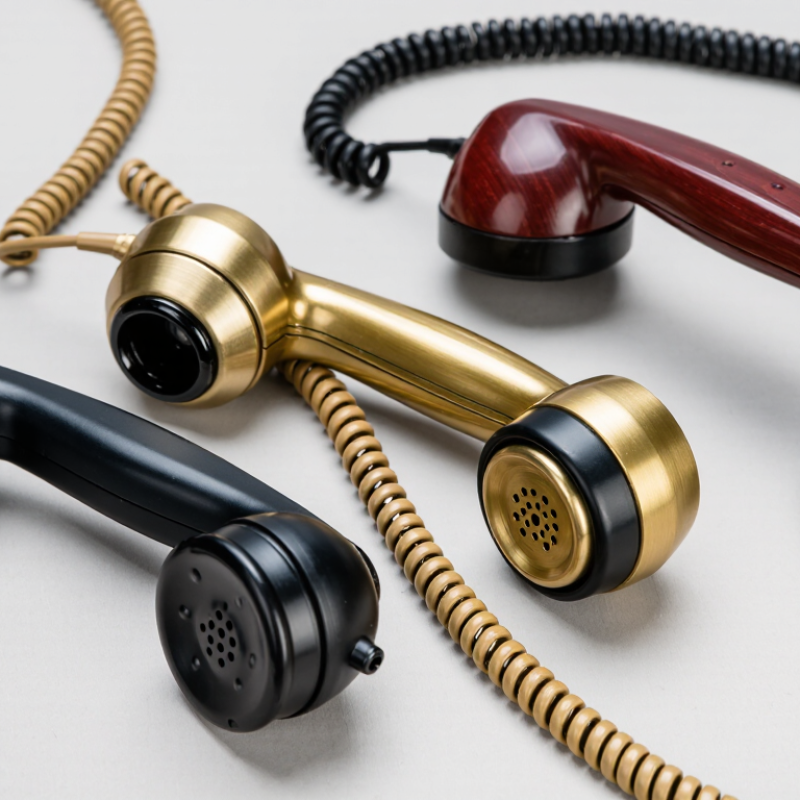
Choosing a retro phone handset starts with its type, not its appearance. A corded model suits a desk and gives a stable, tactile feel. A wireless handset offers more movement but requires charging and pairing. A smartphone-compatible model usually connects through USB-C, Bluetooth, or a 3.5 mm jack. Check compatibility carefully. Ports change quickly.
Sound quality matters more than decorative details. Look for a clear microphone, balanced earpiece, adjustable volume, and basic echo control. The handset should feel solid without becoming tiring. A long coiled cable helps at a desk, while a shorter cable reduces tangling. Fit matters. A broad receiver may feel comfortable, but small hands can struggle with it. I underestimated weight during extended calls once.
Safety deserves attention. The World Health Organization’s World Report on Hearing estimates that more than 1.5 billion people live with hearing loss globally. Avoid handsets that produce harsh peaks or unclear speech. Choose one with smooth volume control and test it at a moderate level. GSMA Intelligence’s Mobile Economy 2024 reports more than 4.6 billion mobile internet users in 2023. That scale makes phone compatibility essential. Check operating-system support, charging requirements, warranty terms, and return conditions. Some retro designs look convincing but use weak cables or fragile switches. Appearance is only half the decision.

Choosing the best retro phone handset starts with checking compatibility, not appearance. A handset may use an RJ9 plug, a modular connector, or a 3.5 mm audio jack. These connections are not interchangeable. Check your phone’s manual and inspect the socket before ordering. A vintage-style handset designed for an analog telephone may not work directly with a mobile phone or computer.
I once assumed that a simple plug adapter would solve every connection problem. That assumption was wrong. Some systems require a telephone adapter with an analog phone port, while others need a compatible headset interface. VoIP systems can also depend on tone dialing, pulse dialing, microphone sensitivity, and receiver impedance. Ask the system provider for supported specifications. A cheap converter may create weak audio, echo, or no dial tone.
Test the handset in the actual environment. Listen for clear speech in a quiet room, then test it near a router or power cable. Check whether the cord fits firmly and whether both callers can hear naturally. Caller ID and call-waiting features may not pass through older adapters. I prefer products with replaceable cords and published wiring details, although specifications can still contain mistakes. Keep the original handset available during testing. It gives you a useful comparison.
Compare typical compatibility across common telephone and communication systems before selecting a retro handset. Compatibility depends on the connector, signaling method, power requirements, and any required adapter.
The scores represent typical compatibility coverage across four common systems: analog landlines, analog PBX extensions, VoIP adapters, and smartphones. Always verify the telephone port, line voltage, dialing method, and adapter requirements.
A retro phone handset should make speech sound natural, not merely loud. During testing, I listen for clear consonants, balanced voices, and low background hiss. A strong receiver keeps conversations understandable at moderate volume. Check whether the handset supports your phone system before judging its sound. Some models look authentic but produce thin, metallic audio. That detail is easy to miss in a short demonstration.
Materials affect both appearance and daily reliability. Dense plastic can feel surprisingly solid, while lightweight plastic may creak near the cord connection. A coiled cable should stretch smoothly and return without sharp kinks. Metal accents add character, but poorly finished edges can scratch a desk or feel cold in the hand. I once chose a heavier handset because it seemed more durable. It became tiring after long calls.
Comfort depends on shape more than nostalgia. The receiver should rest naturally between your ear and shoulder, though shoulder cradling is not ideal for extended use. Look for gently curved ends, a balanced center, and buttons that respond without force. Wipeable surfaces matter in shared spaces. Test the handset for several minutes, not just seconds. My first impression was wrong. A softer grip felt pleasant initially but became slippery later. Durability also includes replaceable cords, firm connectors, and a casing that does not flex when pressed.
How to Choose the Best Retro Phone Handset?
A retro phone handset should feel natural before it looks impressive. Check its weight, grip, cord length, and button placement. A curved receiver should rest comfortably between your shoulder and ear. Smooth plastic is easy to clean, but it can feel slippery with damp hands. A textured finish may provide better control. Inspect the cradle, too. Loose parts often become annoying after repeated use.
Connection options affect daily convenience. A 3.5mm model usually offers simple plug-and-play setup with compatible devices. USB versions may provide clearer digital audio, but they depend on device settings and available ports. Wireless models reduce cable clutter, although pairing can fail in crowded signal areas. During testing, I once chose appearance over cable flexibility. That decision made desk use awkward. I would now check compatibility before judging the design.
Tips: Confirm the connector type, microphone support, and operating-system requirements. Measure the distance between your device and preferred desk position. For installation, follow the included instructions and test both speaking and listening functions. Keep the cable away from chair wheels and sharp desk edges. A handset needing extra drivers or unusual adapters may not be beginner-friendly. If setup feels unclear, stop and verify the manual instead of forcing a connection. Small mistakes can damage ports.
| Handset Type | Design Characteristics | Connection Option | Power Requirement | Typical Installation | Ease of Installation | Best Suited For | Key Consideration |
|---|---|---|---|---|---|---|---|
| Corded Analog Handset | Traditional receiver, coiled cord, rotary or push-button styling, usually made with a hard plastic shell. | RJ11 telephone cable connected to an active analog telephone line or compatible terminal. | Normally powered by the telephone line; ringing and service depend on the connected line. | Insert the modular plug into the telephone socket and connect the handset cord if supplied separately. | Very easy | Users who want the most authentic appearance and simple everyday calling. | It may not work directly with a digital-only telephone service without an analog telephone adapter. |
| Retro Handset for VoIP Adapter | Vintage exterior combined with a standard telephone connector and basic voice controls. | RJ11 connection to an analog telephone adapter, router-based voice terminal, or compatible VoIP gateway. | Requires power for the adapter and network equipment; the handset itself generally has no separate battery. | Connect the handset to the adapter, then configure the adapter with the internet telephone service. | Moderate | Homes and offices using internet-based telephone service while retaining a classic look. | Call quality depends on the network, adapter configuration, and internet service stability. |
| Cordless Retro-Style Handset | Classic handset shape with a wireless base, charging cradle, and contemporary internal electronics. | The base typically connects to an analog telephone socket or compatible telephone adapter. | Rechargeable handset battery plus mains power for the base station. | Connect the base to telephone service and mains power, insert the battery, and place the handset on the cradle. | Moderate | Users who value mobility, a tidy desk, and a retro visual design. | Battery runtime, charging time, and wireless range should be checked before purchase. |
| Mobile-Connected Retro Handset | A vintage-style receiver designed to route calls through a mobile phone or mobile device. | Bluetooth wireless connection or a device-specific wired audio connection. | Usually no separate power for a passive wired model; Bluetooth versions require rechargeable or replaceable batteries. | Pair the handset with the mobile device or connect the audio cable, then grant any required call permissions. | Easy to moderate | Apartments, temporary workspaces, and users who rely mainly on mobile service. | Bluetooth compatibility, microphone behavior, and battery management vary by mobile device. |
| Wall-Mount Retro Telephone | Vertical housing, wall-support hook, fixed handset cord, and a space-saving vintage profile. | Usually RJ11 through an analog telephone line or an analog telephone adapter. | Normally line-powered; additional functions may require mains power. | Mount securely to a suitable wall surface, route the cable, and connect it to the telephone socket. | Moderate | Kitchens, hallways, workshops, and spaces where desk space is limited. | Wall strength, mounting hardware, cord length, and socket location affect installation safety. |
| Decorative Handset with Limited Calling Functions | Emphasizes appearance, with a prominent retro shell and fewer controls than a full telephone set. | May use RJ11, USB, Bluetooth, or another connection depending on the internal design. | Passive wired versions may need no local power; electronic versions can require USB or battery power. | Follow the supplied connection method and verify that the connected equipment supports voice input and output. | Easy to moderate | Interior decoration, occasional calls, photo areas, and themed rooms. | Confirm whether it supports two-way calling, ringing, volume control, and call termination before selecting it. |
Choosing the best retro phone handset starts with your budget and intended use. A decorative handset may suit a desk, studio, or occasional conversation. Daily callers need stronger materials, comfortable grip, and clear audio. Set a practical spending limit before comparing styles. Cheap models can look attractive, but their cords, buttons, or microphones may feel unreliable.
Check compatibility carefully. Some handsets use standard telephone connectors, while others require an adapter for modern devices. Read the technical specifications, not only the product photos. Look for microphone sensitivity, speaker clarity, cable length, and receiver weight. A heavier receiver may feel authentic, but it can become tiring during long calls.
Tips: Test the handset with your actual device before regular use. Keep the receipt and inspect the cable immediately. I once chose appearance over comfort, and the receiver became awkward after fifteen minutes. That mistake still influences my buying decisions. If children or older adults will use it, choose large controls, a secure grip, and simple connection steps. Independent reviews can help, but prioritize detailed testing over dramatic ratings. A return policy also matters, because comfort and sound quality are difficult to judge from a screen.
Fill out the form below and our team will get back to you ASAP.
Snake Tray® is Green and Proudly Powered by the Sun! Snake Tray is committed to designing and manufacturing products that have many green benefits. Our products are made of recycled goods, minimize material waste, are energy efficient, use less non-renewable resources and nest together read more…
Snake Tray® 291 Skip Lane, Bay Shore NY 11706 | PHONE: 631-674-0004 | FAX: 631-674-0010 | www.bakoselectric.com | LEGAL | MADE IN USA
© 2025 SnakeTray. All rights reserved
Fill out the form below to download your document.